There are some memories that you don't ever wish to come across in your entire life and in this modern era, memories remain as Data rather than things (or) people. Recovery tools were initially created for accidental data deletion but some people abuse it to recover other's deleted personal data's from their device.
Several victims of data hack around the world especially women threatened by unknown identities regarding their personal information stored on hard disk drives and flash drives.
Read Also: Best Free Data Recovery Tools to Recover Deleted and Corrupted Files
Who Steals Digital Data's Stored On Disk?
Online intruders are quite common on the internet who steal data's by spreading the virus and infect client computer through websites, nevertheless authorized Antivirus software's are astonishingly effective in preventing the user's from being hacked or infected by virus and other malicious software's.
But online intruders are not the only data hacker's, Every electronic gadget one day may face a crash, hang or damage physically that requires experts hand to fix it, so we take it to service shop but not every service shop are authorized and reliable. Criminal instinct people would peep into your disk drives for deleted personal information and recover it to actual form and thereby threatens for money (or) earn directly by selling it online. So we urge you to make sure that you have permanently deleted data before seeking an expert's hand, because sometime you may find your personal information such as photos, videos which should be in private were set free for the public.
How Deleted Data were Restored?
Whenever we delete a data from disk drives such as hard disk and flash drives, the actual data is not deleted permanently from the disk, only the pointers carrying the address to the data is deleted For instance A blank post without an address cannot be delivered anywhere, likewise, data without pointer's carrying address can never be accessed but it doesn't mean the data is deleted/terminated permanently.
The data are deleted temporarily and kept in stack unless (or ) until a newly deleted data occupy its space the data remains in the disk and can be recovered with recovery tools.
Do Formatting/Partition Deletion Wipes Data Permanently?
The answer to the question is no!. when you format a particular drive you're actually deleting only the file system, but the data remains in the disk and can be recovered with several recovery software tools.
How to Delete Personal Data's Stored on Hard Disk Drive Permanently?
Here in this tutorial, we described 4 ways to delete the personal data stored on hard disk drive permanently which cannot be resurrected any time.
Not satisfied with software tools that delete personal data are stored on disk and cared for personal data more than money, than shred the hard disk into pieces to delete the data permanently. Data are stored on glass platters made with silicon's, shredding the glass platter into pieces would eventually fix your worries of data resurrection.
See Also: How to recover deleted email messages in Gmail account
Read Also: Best Free Data Recovery Tools to Recover Deleted and Corrupted Files
Who Steals Digital Data's Stored On Disk?
Online intruders are quite common on the internet who steal data's by spreading the virus and infect client computer through websites, nevertheless authorized Antivirus software's are astonishingly effective in preventing the user's from being hacked or infected by virus and other malicious software's.
But online intruders are not the only data hacker's, Every electronic gadget one day may face a crash, hang or damage physically that requires experts hand to fix it, so we take it to service shop but not every service shop are authorized and reliable. Criminal instinct people would peep into your disk drives for deleted personal information and recover it to actual form and thereby threatens for money (or) earn directly by selling it online. So we urge you to make sure that you have permanently deleted data before seeking an expert's hand, because sometime you may find your personal information such as photos, videos which should be in private were set free for the public.
How Deleted Data were Restored?
Whenever we delete a data from disk drives such as hard disk and flash drives, the actual data is not deleted permanently from the disk, only the pointers carrying the address to the data is deleted For instance A blank post without an address cannot be delivered anywhere, likewise, data without pointer's carrying address can never be accessed but it doesn't mean the data is deleted/terminated permanently.
The data are deleted temporarily and kept in stack unless (or ) until a newly deleted data occupy its space the data remains in the disk and can be recovered with recovery tools.
Do Formatting/Partition Deletion Wipes Data Permanently?
The answer to the question is no!. when you format a particular drive you're actually deleting only the file system, but the data remains in the disk and can be recovered with several recovery software tools.
How to Delete Personal Data's Stored on Hard Disk Drive Permanently?
Here in this tutorial, we described 4 ways to delete the personal data stored on hard disk drive permanently which cannot be resurrected any time.
 |
| Delete Hard Disk Data Permanently By Shredding |
- CCleaner - Data Wiper tool
- Boot and Nuke Method by Darik
- Eraser - Free & Open Source Tool
- Shred Disk containing data
1. CCleaner - Data Wiper
As we know CCleaner is a software tool by Piriform that cleans temporary data, browsing history, cookies, etc and also used as a tool to defragment hard disk data. Many not aware that the CCleaner tool comes with a data wiper that deletes either free space (or) entire disk data permanently by overwriting data's with random byte codes thus making it impossible to retrieve back. Ccleaner tools can reinforce complexity by running up to 35 passes of overwritten random byte codes.
How to Wipe Data with CCleaner tool |
| CCleaner Data wiper tool |
- Download and install the CCleaner tool
- Open the wizard and navigate to tools -> driver wiper
- Select any one of the two options below
- Free space only to delete the data's permanently which doesn't have pointer's referencing to the data. (i.e. Deleted data from disk)
- Entire data to delete the entire data on the disk permanently without the possibility to recover back.
- Set complexity types by no of passes
- Simple overwrite - Perform 1 Pass
- Advanced overwrite - Performs 3 Pass
- Complex overwrite - Performs 7 Pass
- Very complex overwrite - Performs 35 Pass
- Click the preferred disk to be deleted permanently.
- And click wipe and wait for the process.
- Now you're done.
2. Boot and Nuke Method by Darik:
An application that destroys data permanently, Unlike low-level formatting that leaves traces of data sector's boot and nuke method, doesn't leave any traces of data residue.
How to Delete Data With DBAN method:
Eraser is an advanced and free open-source utility tool that deletes the data permanently from hard disk by overwriting data with random bytes of codes several numbers of times. Ccleaner's data wiper and eraser is relatively efficient and similar tools that delete data by overwriting with random byte of codes. But Eraser has an advanced option to shred/delete a single file whereas CCleaner delete's entire free space.
Eraser tool can also
How to Erase Data Permanently With "Eraser"
 |
| DBAN tool to permanently delete hard disk data |
- Download DBAN iso file
- Burn the iso file into CD/DVD or USB flash drive (Note: Use any Image burner to burn iso files into CD/DVD/USB to make it bootable)
- Restart the computer with the burn CD/DVD disk into the drive.
- Set the booting order to CD/DVD, to boot from CD
- Enter auto nuke when it prompts to start DBAN tool in auto mode
- Select the disk to be deleted permanently and proceed
- And you're done.
Eraser is an advanced and free open-source utility tool that deletes the data permanently from hard disk by overwriting data with random bytes of codes several numbers of times. Ccleaner's data wiper and eraser is relatively efficient and similar tools that delete data by overwriting with random byte of codes. But Eraser has an advanced option to shred/delete a single file whereas CCleaner delete's entire free space.
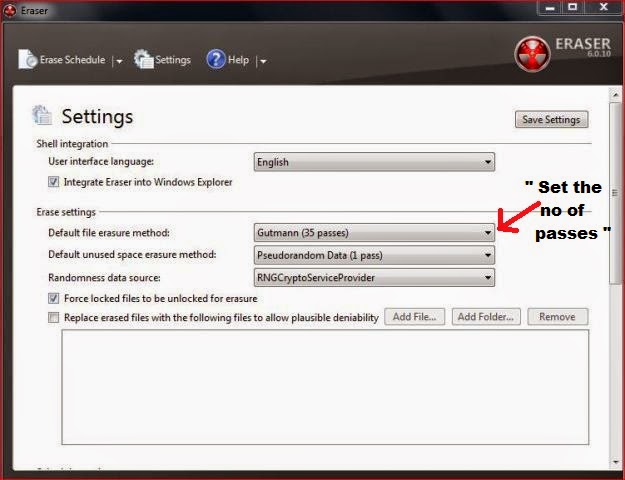 |
| Eraser tool settings |
- Permanently delete currently available data on disk
- Permanently delete data on free space (i.e. unavailable data on disk, already deleted data)
 |
| Data selection to Erase |
How to Erase Data Permanently With "Eraser"
- Download and install the eraser tool
- Open the wizard and right-click on the blank space
- Select new task and task properties window prompts
- Click add data on task properties windows
- Click the drop-down to ensure the no of passes to delete
- And select data's to be deleted either from available disk space (or) unused disk space
- And click ok then you're done
4. Shred Disk containing Data:
Not satisfied with software tools that delete personal data are stored on disk and cared for personal data more than money, than shred the hard disk into pieces to delete the data permanently. Data are stored on glass platters made with silicon's, shredding the glass platter into pieces would eventually fix your worries of data resurrection.
See Also: How to recover deleted email messages in Gmail account
Comments
Post a Comment